VMS on MikroTik RouterOS (ARM / ARM64)
Infiniviz VMS is an RTSP/RTMP/ONVIF-compatible video management system for home CCTV IP surveillance. It supports ONVIF device discovery as well as RTSP/RTMP push/pull to centralize management, playback, and recording of different video sources on your LAN.
Published image: infiniviz/infiniviz-vms
Quick start
Four steps. Where your router does not match what a step expects, it links to the section with the details.
-
Make sure the router runs RouterOS 7.21 or newer. In Terminal:
/system/resource/printversionmust be 7.21 or newer andarchitecture-namemust bearm64orarm. Older version: see Upgrading RouterOS to 7.21. Different architecture: see Supported routers. -
Enable containers. Once the container package is installed, the WebFig / WinBox sidebar has a Containers entry, usually below Tools:
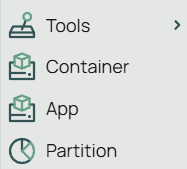
Container menu entry on the new WebFig UI 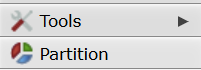
Missing Containers entry on the old WebFig UI Device mode must allow containers too:
/system/device-mode/printshowscontainer: yes. If either is missing, follow Enable containers. It takes a reboot and physical access to the router. -
Install Infiniviz VMS. Attach an external disk formatted as ext4 (a USB SSD or NVMe, not the internal flash), then in Terminal:
/tool/fetch url="https://vms.infiniviz.com/docs/install-infiniviz-vms.rsc" dst-path=install-infiniviz-vms.rsc
/import file-name=install-infiniviz-vms.rsc
The import waits until the container is running; the first download takes a few minutes. If several disks are mounted, the import lists them and waits for a number — see Install Infiniviz VMS.
-
Open
https://infiniviz-vms.localand accept the self-signed certificate warning once. If the name does not resolve, see Open the web UI.
Done. Later on: Upgrading Infiniviz VMS · Resource limits · Troubleshooting.
Upgrading RouterOS to 7.21
The install script needs RouterOS 7.21 or newer. On anything older it stops before changing anything.
If version is 6.x, containers, /interface/veth and device mode do not exist yet — they are all RouterOS 7 features. Moving to v7 is a bigger step than the 7.x upgrade below: get to 6.47 or newer first, then take the v7 upgrade (MikroTik routes older devices through an intermediate v7 release), and expect to check your configuration afterwards because v7 converts it. See MikroTik's Upgrading to v7, then continue below.
Before upgrading, take a backup. In Terminal:
/export show-sensitive file=backup-config
/system/backup/save name=pre-upgrade
Keep both and download them off the router. On RouterOS 7 a plain /export omits passwords and keys, so without show-sensitive the file cannot restore a working configuration. The binary backup keeps everything but only restores onto the same RouterOS version, which is why the text export matters after a version change.
Then open System → Packages, click Check For Updates, pick the stable channel and click Download & Install. The router downloads the new version, together with matching versions of the extra packages it already has, and reboots. The same from Terminal:
/system/package/update/check-for-updates
/system/package/update/install
Once the router is back up, upgrade the bootloader as well:
/system/routerboard/print
/system/routerboard/upgrade
If current-firmware was older than upgrade-firmware, reboot once more to apply it.
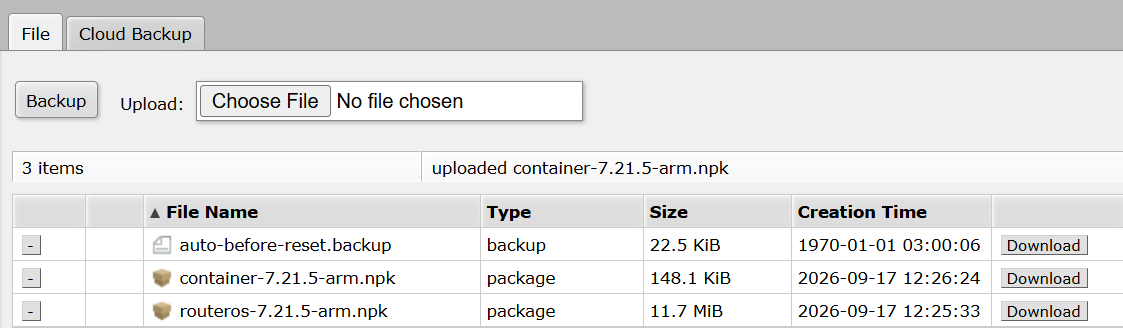
If the router cannot reach the internet, download the RouterOS and container packages for your architecture from the MikroTik download page, both at the same version, upload them under Files and reboot. Wait until the uploads finish before rebooting. A device with wifi or other extras needs those at the same version in Files too, or use the all_packages bundle — otherwise the upgrade fails against the older extra packages.
Supported routers
- MikroTik router with an ARM64 or ARM (32-bit) CPU (
architecture-name: arm64orarm) - RouterOS 7.21 or newer
- External ext4 storage (USB SSD / NVMe recommended; do not use internal flash)
If architecture-name is mmips, mipsbe, smips, ppc or tile, this router cannot run containers at all — RouterOS only has the feature on arm, arm64 and x86, and no RouterOS version changes that. Devices like the classic hEX and hAP lite are in this group.
If it is x86, the router supports containers but the published image has no 32-bit x86 build, so it will not run here. Devices such as the RB5009 and hAP ax³ are arm64; many earlier ARM models are arm.
Run /disk/print in Terminal and check that your external storage shows up with an ext4 file system and a value in the MOUNT-POINT column. That name is the one the script uses (disk1, usb1-part1, …). The raw block device above it (usb1, no mount point) is not a filesystem — a path under that name lands on the router's internal storage. If it is the only mounted ext4 disk, the install script picks it by itself; if there are several, note the mount point of the one to use.
Enable containers
If the sidebar has no Containers entry (see the screenshots in Quick start step 2), install the container package. MikroTik's own docs: Containers.
- In the sidebar open System → Packages.
- Click Check For Updates. This also lists packages that are available but not installed, greyed out (flags
Aavailable,Xdisabled). Without this stepcontainerdoes not appear in the list at all. - Select
container, click Enable, then Apply Changes. The router downloads the package and schedules it for installation; reboot to finish.
Confirm device mode
Containers also have to be allowed in device mode. In Terminal, run /system/device-mode/print. If the list shows container: yes, you are ready. Otherwise:
/system/device-mode/update container=yes
This one needs physical access. RouterOS prints a prompt and gives you roughly five minutes to confirm, either by pressing the reset (or mode) button or by cutting power — a soft /system/reboot does not count. If the window expires the change is cancelled and you have to run the command again.
Install Infiniviz VMS
The two commands in Quick start step 3 download the install script from this site and import it. It sets up the container for you; this section covers the cases where it needs something from you first.
The script uses your external disk when it is the only mounted ext4 disk on the router. If there are several, it prints a numbered list and waits for you to type a number (this only works in Terminal). If nothing is ext4 but another filesystem is mounted (NTFS, exFAT, btrfs, …), it lists those and asks the same way. To skip the prompt, set the mount point first, then run the two commands again:
:global ivDisk "usb1-part1"
Use the MOUNT-POINT value. Passing the block-device slot (usb1) is accepted only when that disk has a single mounted ext4 partition, and the script then uses the partition's mount point.
The script is safe to run again. It creates what is missing, and if the container is stopped it moves root-dir and the data mounts onto the disk named above. It does not change those paths while the container is running, and running it again does not update Infiniviz VMS — see Upgrading Infiniviz VMS.
VMS needs ONVIF WS-Discovery on the same L2 as the cameras, so the script bridges the container onto the LAN (MikroTik's Layer-2 container mode — their equivalent of Docker host networking). See MikroTik's Container docs.
This is the full script, so you can read what it does before running it. If the router cannot reach this site, download install-infiniviz-vms.rsc, upload it under Files, and run only the /import line. The variables under "Edit before import" at the top can be changed in the file instead of with :global.
# install-infiniviz-vms.rsc - RouterOS container install (Layer-2 / LAN)
#
# Puts the container on the LAN bridge so ONVIF WS-Discovery (and mDNS) see the
# same L2 domain as cameras. This is MikroTik's equivalent of Docker "host"
# networking - still a veth, not a shared netns; see
# https://help.mikrotik.com/docs/spaces/ROS/pages/84901929/Container
#
# Needs RouterOS 7.21+: mount lists (list= / mountlists=) arrived in 7.21 and
# veth dhcp= in 7.20. The script checks the version before changing anything.
#
# Networking: veth dhcp=yes + bridge port. Do NOT use
# /ip/dhcp-client on the veth - bridged ports are slaves and that client stays
# INVALID ("can not run on slave or passthrough interface").
#
# Idempotent: safe to /import again. Missing veth / mounts / container are
# created. While the container is stopped, root-dir and mount src follow the
# disk chosen below; a running container keeps its paths. Import waits until
# the container is running (first image pull can take several minutes), then
# prints the setup token.
# Re-importing never pulls a newer image: use upgrade-infiniviz-vms.rsc for that.
#
# Prerequisites (one-time, physical access):
#   /system/device-mode/update container=yes
#   then reset button (ARM) or cold reboot; install the `container` package.
# External ext4 storage for root-dir + mounts. Paths use the MOUNT-POINT
# column from /disk print (usb1-part1, disk1, ...), not the raw block device
# (usb1). A path that is not a mounted filesystem lands on internal storage.
#
# Edit before import:
#   - lanBridge   - usually "bridge" on default SOHO configs
#   - disk        - leave "" to use the router's only mounted ext4 filesystem.
#                   When there is more than one, the import lists them and
#                   asks for a number (Terminal only). Or, without editing:
#                   :global ivDisk "usb1-part1" before /import.
#                   A block-device slot (usb1) is resolved to its mounted
#                   partition. Re-import applies a new disk only while the
#                   container is stopped.
#   - remoteImage - Docker Hub repo:tag
#   - registryUrl - https://registry-1.docker.io
#
# Import: /import file-name=install-infiniviz-vms.rsc
# Or fetch and import without editing (globals override the values below):
#   :global ivDisk "usb1-part1"
#   /tool/fetch url="https://vms.infiniviz.com/docs/install-infiniviz-vms.rsc" dst-path=install-infiniviz-vms.rsc
#   /import file-name=install-infiniviz-vms.rsc
#
# Mounts (list=, not name=): company-level /var/lib and /var/log so product
# folders (vms today, portal later) appear underneath - same layout as
# /opt/infiniviz/{vms,portal}. /opt stays in the image so pulls refresh the
# binary/wwwroot. Logs + crash dumps share the log mount.

:local lanBridge "bridge"
:local disk ""
:local registryUrl "https://registry-1.docker.io"
:local remoteImage "infiniviz/infiniviz-vms:latest"
:local vethName "veth-infiniviz-vms"
:local mountListLib "infiniviz-var-lib"
:local mountListLog "infiniviz-var-log"
:local mountLists ($mountListLib . "," . $mountListLog)
:local containerName "infiniviz-vms"

# "7.22.1 (stable)", "7.21beta3 (testing)" -> major 7, minor 22/21.
:local ver [/system/resource/get version]
:local dot [:find $ver "."]
:local major [:tonum [:pick $ver 0 $dot]]
:local minorStr ""
:local i ($dot + 1)
:while (($i < [:len $ver]) && ([:pick $ver $i] ~ "[0-9]")) do={
    :set minorStr ($minorStr . [:pick $ver $i])
    :set i ($i + 1)
}
:local minor [:tonum $minorStr]
:if (($major < 7) || (($major = 7) && ($minor < 21))) do={
    :error ("infiniviz-vms: RouterOS " . $ver . " is too old - upgrade RouterOS to 7.21 or newer first")
}

# Lists $2 (n = $3) and reads a 1-based number. $4, when set, is the
# filesystem name printed beside each mount point. A single entry is a
# string; several are an array. :terminal/ask needs an interactive Terminal.
:local pickMountPoint do={
    :local title $1
    :local list $2
    :local n $3
    :local labels $4
    :put $title
    :for i from=1 to=$n do={
        :local mp $list
        :local label ""
        :if ($n > 1) do={
            :local idx ($i - 1)
            :set mp ($list->$idx)
        }
        :if ([:typeof $labels] != "nothing") do={
            :set label $labels
            :if ($n > 1) do={
                :local idx ($i - 1)
                :set label ($labels->$idx)
            }
        }
        :if ($label != "") do={
            :put ("  " . $i . ") " . $mp . " (" . $label . ")")
        } else={
            :put ("  " . $i . ") " . $mp)
        }
    }
    :while (true) do={
        :local answer ""
        :do {
            :set answer [/terminal/ask "infiniviz-vms: enter a number"]
        } on-error={
            :error "infiniviz-vms: could not read a choice from this terminal. set  :global ivDisk \"<mount-point>\"  and /import again"
        }
        :local num [:tonum $answer]
        :if (([:typeof $num] = "num") && ($num >= 1) && ($num <= $n)) do={
            :if ($n = 1) do={
                :return $list
            }
            :local idx ($num - 1)
            :return ($list->$idx)
        }
        :put ("infiniviz-vms: enter a number from 1 to " . $n)
    }
}

# Pick the filesystem before anything is changed: :global ivDisk, then the
# value above, then the only mounted ext4 filesystem. Several ext4 matches,
# or no ext4 but some other mounted filesystem (ntfs, exfat, btrfs, ...):
# ask for a number. The path prefix is always MOUNT-POINT. A block-device
# slot with no mount of its own (usb1) resolves to its mounted partition.
:global ivDisk
:if (([:typeof $ivDisk] = "str") && ($ivDisk != "")) do={ :set disk $ivDisk }

:local mountPoint ""
:if ($disk = "") do={
    :local n 0
    :local list
    :local nOther 0
    :local otherList
    :local otherFs
    :foreach d in=[/disk/find] do={
        :local mp [/disk/get $d mount-point]
        :local fs [/disk/get $d fs]
        # Unmounted rows still have fs="-" and a nothing mount-point. nothing is
        # not "", and stuffing it into an array drops the element while the
        # counter and the fs list keep growing, so the menu numbers no longer
        # match the names.
        :if (([:typeof $mp] = "str") && ($mp != "") && ($mp != "-") && ([:typeof $fs] = "str") && ($fs != "") && ($fs != "-")) do={
            :if ($fs = "ext4") do={
                :if ($n = 0) do={
                    :set list $mp
                } else={
                    :set list ($list, $mp)
                }
                :set n ($n + 1)
            } else={
                :if ($nOther = 0) do={
                    :set otherList $mp
                    :set otherFs $fs
                } else={
                    :set otherList ($otherList, $mp)
                    :set otherFs ($otherFs, $fs)
                }
                :set nOther ($nOther + 1)
            }
        }
    }
    :if ($n = 0) do={
        :if ($nOther = 0) do={
            :error "infiniviz-vms: no mounted disk found - attach external storage (see /disk/print, MOUNT-POINT column)"
        }
        :set mountPoint [$pickMountPoint "infiniviz-vms: no mounted ext4 disk. other filesystems can be used; ext4 is preferable if you can format the disk. pick one:" $otherList $nOther $otherFs]
    } else={
        :if ($n > 1) do={
            :set mountPoint [$pickMountPoint "infiniviz-vms: more than one mounted ext4 disk, pick one:" $list $n]
        } else={
            :set mountPoint $list
        }
    }
    :put ("infiniviz-vms: using mount-point " . $mountPoint)
} else={
    :local byMount [/disk/find where mount-point=$disk]
    :if ([:len $byMount] > 0) do={
        :set mountPoint $disk
    } else={
        :local bySlot [/disk/find where slot=$disk]
        :if ([:len $bySlot] = 0) do={
            :error ("infiniviz-vms: disk \"" . $disk . "\" not found - check /disk/print (MOUNT-POINT column)")
        }
        :local slotMount [/disk/get $bySlot mount-point]
        :if ($slotMount != "") do={
            :set mountPoint $slotMount
        } else={
            :local prefix ($disk . "-part")
            :local n 0
            :local list
            :local labels
            :foreach d in=[/disk/find] do={
                :local slot [/disk/get $d slot]
                :local mp [/disk/get $d mount-point]
                :local fs [/disk/get $d fs]
                :if (([:typeof $mp] = "str") && ($mp != "") && ($mp != "-") && ([:typeof $fs] = "str") && ($fs != "") && ($fs != "-") && ([:find $slot $prefix] = 0)) do={
                    :if ($n = 0) do={
                        :set list $mp
                        :set labels $fs
                    } else={
                        :set list ($list, $mp)
                        :set labels ($labels, $fs)
                    }
                    :set n ($n + 1)
                }
            }
            :if ($n = 0) do={
                :error ("infiniviz-vms: \"" . $disk . "\" is not mounted - use the MOUNT-POINT (for example " . $disk . "-part1), not the block device")
            }
            :if ($n > 1) do={
                :set mountPoint [$pickMountPoint ("infiniviz-vms: \"" . $disk . "\" has more than one mounted partition, pick one:") $list $n $labels]
            } else={
                :set mountPoint $list
            }
            :put ("infiniviz-vms: \"" . $disk . "\" is not a mount-point; using " . $mountPoint)
        }
    }
    :if ([:len [/disk/find where mount-point=$mountPoint]] = 0) do={
        :error ("infiniviz-vms: mount-point \"" . $mountPoint . "\" not found - check /disk/print")
    }
}

:if (([:typeof $mountPoint] != "str") || ($mountPoint = "")) do={
    :error "infiniviz-vms: no mount-point selected - check /disk/print and pick a row with MOUNT-POINT and FS set"
}

:local tmpDir ($mountPoint . "/pull")
:local libSrc ($mountPoint . "/infiniviz-var-lib")
:local logSrc ($mountPoint . "/infiniviz-var-log")
:local rootDir ($mountPoint . "/images/infiniviz-vms")

/container/config/set registry-url=$registryUrl tmpdir=$tmpDir
# Private registry: /container/config/set username=... password=...

# Layer-2: DHCP on the veth itself (not /ip/dhcp-client), then bridge.
:if ([:len [/interface/veth/find where name=$vethName]] = 0) do={
    /interface/veth/add name=$vethName dhcp=yes comment="infiniviz-vms"
} else={
    /interface/veth/set [find where name=$vethName] dhcp=yes
}
:if ([:len [/interface/bridge/port/find where interface=$vethName]] = 0) do={
    /interface/bridge/port/add bridge=$lanBridge interface=$vethName
}

# A stopped container follows the disk chosen above. A running one is left
# alone: root-dir and mount src cannot move while it is up.
:local containerExists ([:len [/container/find where name=$containerName]] > 0)
:local containerStopped false
:if ($containerExists) do={
    :set containerStopped ([:len [/container/find where name=$containerName stopped]] > 0)
}
:local applyDisk (($containerExists = false) || ($containerStopped = true))

:if ($applyDisk) do={
    :local libId [/container/mounts/find where list=$mountListLib]
    :if ([:len $libId] = 0) do={
        /container/mounts/add list=$mountListLib src=$libSrc dst=/var/lib/infiniviz
    } else={
        :local cur [/container/mounts/get $libId src]
        :if ($cur != $libSrc) do={
            /container/mounts/set $libId src=$libSrc
            :put ("infiniviz-vms: mount " . $mountListLib . " " . $cur . " -> " . $libSrc)
        }
    }
    :local logId [/container/mounts/find where list=$mountListLog]
    :if ([:len $logId] = 0) do={
        /container/mounts/add list=$mountListLog src=$logSrc dst=/var/log/infiniviz
    } else={
        :local cur [/container/mounts/get $logId src]
        :if ($cur != $logSrc) do={
            /container/mounts/set $logId src=$logSrc
            :put ("infiniviz-vms: mount " . $mountListLog . " " . $cur . " -> " . $logSrc)
        }
    }
} else={
    :local libId [/container/mounts/find where list=$mountListLib]
    :if ([:len $libId] > 0) do={
        :local cur [/container/mounts/get $libId src]
        :if ($cur != $libSrc) do={
            :put ("infiniviz-vms: container is running, left mount " . $mountListLib . " at " . $cur . " (wanted " . $libSrc . "). stop it and /import again to apply")
        }
    }
    :local logId [/container/mounts/find where list=$mountListLog]
    :if ([:len $logId] > 0) do={
        :local cur [/container/mounts/get $logId src]
        :if ($cur != $logSrc) do={
            :put ("infiniviz-vms: container is running, left mount " . $mountListLog . " at " . $cur . " (wanted " . $logSrc . "). stop it and /import again to apply")
        }
    }
}

:if ($containerExists = false) do={
    /container/add \
        remote-image=$remoteImage \
        interface=$vethName \
        root-dir=$rootDir \
        mountlists=$mountLists \
        name=$containerName \
        start-on-boot=yes \
        logging=yes
} else={
    :if ($containerStopped) do={
        :local curRoot [/container/get [/container/find where name=$containerName] root-dir]
        :if ($curRoot != $rootDir) do={
            /container/set [/container/find where name=$containerName] root-dir=$rootDir
            :put ("infiniviz-vms: root-dir " . $curRoot . " -> " . $rootDir)
        }
    } else={
        :local curRoot [/container/get [/container/find where name=$containerName] root-dir]
        :if ($curRoot != $rootDir) do={
            :put ("infiniviz-vms: container is running, left root-dir " . $curRoot . " (wanted " . $rootDir . "). stop it and /import again to apply")
        }
    }
}

:local cid [/container/find where name=$containerName]
:if ([:len $cid] = 0) do={
    :error "infiniviz-vms: container not found after add"
}

# stdout is copied into /log only when a rule keeps the container topic.
# Default rules usually do (via info); pin one so the setup-token line is stored.
:if ([:len [/system/logging/find where topics~"container"]] = 0) do={
    :do {
        /system/logging/add topics=container action=memory
    } on-error={
        :put "infiniviz-vms: could not add a container logging rule; the setup token will be read from disk only"
    }
}

# Log .id is "*1A3". Numeric order is chronological.
:local logIdNum do={
    :local s [:tostr $1]
    :if ([:pick $s 0 1] = "*") do={
        :set s [:pick $s 1 [:len $s]]
    }
    :if ($s = "") do={
        :return 0
    }
    :return [:tonum ("0x" . $s)]
}
# "setup token: <value>" is one stdout line. The line before it is
# "this instance has not been claimed ..." and does not contain the value.
:local tokenFromMessage do={
    :local marker "setup token: "
    :local pos [:find $1 $marker]
    :if ([:typeof $pos] != "num") do={
        :return ""
    }
    :local value [:pick $1 ($pos + [:len $marker]) [:len $1]]
    :local space [:find $value " "]
    :if ([:typeof $space] = "num") do={
        :return [:pick $value 0 $space]
    }
    :return $value
}

# /container/start is async, and errors if the container is already up.
# Snapshot the log first so a token line from an earlier process is ignored
# when this import is the thing that starts it.
:local alreadyRunning ([:len [/container/find where name=$containerName running]] > 0)
:local logBaseline 0
:if ($alreadyRunning = false) do={
    :foreach item in=[/log find] do={
        :local n [$logIdNum $item]
        :if ($n > $logBaseline) do={
            :set logBaseline $n
        }
    }
    /container/start $cid
}
:local waitSecs 600
:local waited 0
:local interval 5
:local ready false
:local failed false
:while (($ready = false) && ($failed = false) && ($waited < $waitSecs)) do={
    :if ($ready = false) do={
        :do {
            :if ([:len [/container/find where name=$containerName running]] > 0) do={
                :set ready true
            }
        } on-error={}
    }
    :if ($failed = false) do={
        :do {
            :if ([:len [/container/find where name=$containerName failed]] > 0) do={
                :set failed true
            }
        } on-error={}
    }
    :if (($ready = false) && ($failed = false)) do={
        :put ("infiniviz-vms: waiting for container (" . $waited . "s / " . $waitSecs . "s)")
        :delay 5s
        :set waited ($waited + $interval)
    }
}
:if ($failed = true) do={
    :error "infiniviz-vms failed to start - check /container/print and container logs"
}
:if ($ready = false) do={
    :error ("infiniviz-vms still not running after " . $waitSecs . "s - check /container/print")
}
:put "infiniviz-vms running - open https://infiniviz-vms.local (self-signed cert)"

# The token is logged at the same moment it is written to disk, but that is
# after the TLS key and the database, which on a router is often more than a
# few seconds after status flips to running. /file get contents also stays
# empty for files the container created, so the log line is the one to trust.
:local tokenFile ($libSrc . "/vms/instance-setup-token.txt")
:local token ""
# "token" or "claimed". One of "setup token:" / "this instance has been claimed"
# is logged on every start once auth is up. The file is only a fallback: it must
# not end the wait, or a leftover token wins over the claimed line.
:local tokenState ""
:local tokenWaitSecs 60
:if ($alreadyRunning = true) do={
    :set tokenWaitSecs 5
}
:local tokenWaited 0
:while (($tokenState = "") && ($tokenWaited < $tokenWaitSecs)) do={
    :local claimedNum $logBaseline
    :foreach item in=[/log find where message~"this instance has been claimed"] do={
        :local n [$logIdNum $item]
        :if ($n > $claimedNum) do={
            :set claimedNum $n
        }
    }
    :if ($claimedNum > $logBaseline) do={
        :set tokenState "claimed"
    }
    :if ($tokenState = "") do={
        :local bestId ""
        :local bestNum $logBaseline
        :foreach item in=[/log find where message~"setup token:"] do={
            :local n [$logIdNum $item]
            :if ($n > $bestNum) do={
                :set bestNum $n
                :set bestId $item
            }
        }
        :if (($bestId != "") && ($bestNum > $claimedNum)) do={
            :local claimedAfter false
            :foreach item in=[/log find where message~"instance claimed by local owner"] do={
                :if ([$logIdNum $item] > $bestNum) do={
                    :set claimedAfter true
                }
            }
            :if ($claimedAfter = true) do={
                :set tokenState "claimed"
            } else={
                :do {
                    :set token [$tokenFromMessage [/log get $bestId message]]
                } on-error={}
                :if (([:typeof $token] = "str") && ($token != "")) do={
                    :set tokenState "token"
                }
            }
        }
    }
    :if ($tokenState = "") do={
        :local tokenId [/file/find where name=$tokenFile]
        :if ([:len $tokenId] = 0) do={
            :set tokenId [/file/find where name~"instance-setup-token"]
        }
        :if ([:typeof $tokenId] = "array") do={
            :set tokenId ($tokenId->0)
        }
        :if ([:len $tokenId] > 0) do={
            :do {
                :set token [/file/get $tokenId contents]
            } on-error={}
        }
        :if (($tokenWaited > 0) && (($tokenWaited % 5) = 0)) do={
            :put ("infiniviz-vms: waiting for setup token (" . $tokenWaited . "s / " . $tokenWaitSecs . "s)")
        }
        :delay 1s
        :set tokenWaited ($tokenWaited + 1)
    }
}
:if ($tokenState = "claimed") do={
    :put "infiniviz-vms: this instance has been claimed"
} else={
    :if (([:typeof $token] = "str") && ($token != "")) do={
        :put ("infiniviz-vms: setup token: " . $token)
    } else={
        :put "infiniviz-vms: setup token not found in /log or on disk. on the router:"
        :put "  /log/print where message~\"setup token:\""
        :put ("  /file/print where name=\"" . $tokenFile . "\"")
        :put "infiniviz-vms: if the log line is missing, /container/stop [find where name=infiniviz-vms] and /import this script again"
    }
}
After the import you should see infiniviz-vms under Containers. The import waits until the container is running, then prints infiniviz-vms: setup token: ... when the instance has no account yet. The first start downloads the image from Docker Hub and unpacks it onto the external disk, which can take a few minutes — progress lines print while it waits, and /container/print shows the same status.
Open the web UI
Open https://infiniviz-vms.local. The server uses a self-signed TLS certificate, so accept the browser warning once. If .local does not resolve on your client, use the veth's DHCP lease instead:
/interface/veth/print detail where name=veth-infiniviz-vms
The certificate covers the instance's addresses as well as the mDNS name, so the IP works without a second warning.
Upgrading Infiniviz VMS
The container keeps the image it downloaded at install time. Restarting it, rebooting the router or running the install script again all start the same version. To move to the latest release, run the upgrade script in Terminal:
/tool/fetch url="https://vms.infiniviz.com/docs/upgrade-infiniviz-vms.rsc" dst-path=upgrade-infiniviz-vms.rsc
/import file-name=upgrade-infiniviz-vms.rsc
It stops the container, downloads the latest image, unpacks it and starts the container again, printing progress while it waits. The recordings database, certificates and logs live on the mounts outside the container image, so they are kept. Settings you made on the container, such as the memory limits below, are kept too.
On RouterOS 7.22 and newer a single command does the same, and you can watch it under Containers:
/container/repull [find where name=infiniviz-vms]
If the router cannot reach this site, download upgrade-infiniviz-vms.rsc, upload it under Files and run only the /import line. The full script:
# upgrade-infiniviz-vms.rsc - pull the latest infiniviz-vms image on RouterOS
#
# The container keeps the image it unpacked at install time: stop/start and
# re-importing install-infiniviz-vms.rsc never look at the registry again.
# This script re-pulls remote-image (latest) into the same container, so the
# veth, mounts, memory limits and other settings stay as they are.
#
# Data is not touched: /var/lib/infiniviz and /var/log/infiniviz are mounts on
# the disk outside root-dir. Only the image (/opt/infiniviz) is replaced.
#
# Needs RouterOS 7.21+, like the install script. 7.22+ can also do it by hand with
#   /container/repull [find where name=infiniviz-vms]
# but this script works on 7.21 too, where repull neither stops nor
# restarts the container, and waits until the new image is running.
#
# Fetch and import:
#   /tool/fetch url="https://vms.infiniviz.com/docs/upgrade-infiniviz-vms.rsc" dst-path=upgrade-infiniviz-vms.rsc
#   /import file-name=upgrade-infiniviz-vms.rsc

:local containerName "infiniviz-vms"

# "7.22.1 (stable)", "7.21beta3 (testing)" -> major 7, minor 22/21.
:local ver [/system/resource/get version]
:local dot [:find $ver "."]
:local major [:tonum [:pick $ver 0 $dot]]
:local minorStr ""
:local i ($dot + 1)
:while (($i < [:len $ver]) && ([:pick $ver $i] ~ "[0-9]")) do={
    :set minorStr ($minorStr . [:pick $ver $i])
    :set i ($i + 1)
}
:local minor [:tonum $minorStr]
:if (($major < 7) || (($major = 7) && ($minor < 21))) do={
    :error ("infiniviz-vms: RouterOS " . $ver . " is too old - upgrade RouterOS to 7.21 or newer first")
}

:local cid [/container/find where name=$containerName]
:if ([:len $cid] = 0) do={
    :error "infiniviz-vms: container not found - install it with install-infiniviz-vms.rsc"
}

# repull wants a stopped container before 7.22. 7.22+ stops it itself, but
# stopping first keeps one path for every version.
:if ([:len [/container/find where name=$containerName stopped]] = 0) do={
    :put "infiniviz-vms: stopping container"
    /container/stop $cid
}
:local waited 0
:while (([:len [/container/find where name=$containerName stopped]] = 0) && ($waited < 120)) do={
    :delay 2s
    :set waited ($waited + 2)
}
:if ([:len [/container/find where name=$containerName stopped]] = 0) do={
    :error "infiniviz-vms: container did not stop within 120s - check /container/print"
}

# :parse keeps the script loadable where repull does not exist.
:put "infiniviz-vms: pulling the latest image"
:local repull [:parse ("/container/repull [/container/find where name=" . $containerName . "]")]
:do {
    $repull
} on-error={
    :do { /container/start $cid } on-error={}
    :error "infiniviz-vms: repull failed - the previous image was restarted; check /container/log and the registry settings under /container/config"
}

# Wait for the pull and unpack to finish: the container settles as stopped
# (7.21) or running (7.22+ restarts it) with no extracting/stopping flag.
:local waitSecs 900
:set waited 0
:local settled false
:delay 5s
:while (($settled = false) && ($waited < $waitSecs)) do={
    :local busy (([:len [/container/find where name=$containerName extracting]] > 0) \
        || ([:len [/container/find where name=$containerName stopping]] > 0) \
        || ([:len [/container/find where name=$containerName starting]] > 0))
    :local idle (([:len [/container/find where name=$containerName stopped]] > 0) \
        || ([:len [/container/find where name=$containerName running]] > 0))
    :if (($busy = false) && ($idle = true)) do={
        :set settled true
    } else={
        :put ("infiniviz-vms: waiting for the new image (" . $waited . "s / " . $waitSecs . "s)")
        :delay 5s
        :set waited ($waited + 5)
    }
}
:if ($settled = false) do={
    :error ("infiniviz-vms: image still not unpacked after " . $waitSecs . "s - check /container/print")
}

:if ([:len [/container/find where name=$containerName running]] = 0) do={
    /container/start $cid
}
:set waitSecs 300
:set waited 0
:while (([:len [/container/find where name=$containerName running]] = 0) && ($waited < $waitSecs)) do={
    # Stopped again with nothing in progress after a grace period = it exited.
    :if (($waited >= 15) \
        && ([:len [/container/find where name=$containerName stopped]] > 0) \
        && ([:len [/container/find where name=$containerName starting]] = 0)) do={
        :error "infiniviz-vms: container exited after the upgrade - check /container/log"
    }
    :put ("infiniviz-vms: waiting for container (" . $waited . "s / " . $waitSecs . "s)")
    :delay 5s
    :set waited ($waited + 5)
}
:if ([:len [/container/find where name=$containerName running]] = 0) do={
    :error ("infiniviz-vms: still not running after " . $waitSecs . "s - check /container/print")
}
:put "infiniviz-vms upgraded and running - open https://infiniviz-vms.local"
Resource limits
SOHO devices (RB5009, hAP ax³, …) have roughly 1 GB of RAM shared with RouterOS itself. If the router gets tight, cap the container:
/container/set [find where name=infiniviz-vms] memory-high=256M memory-max=512M
Troubleshooting
See what the container is doing. The script sets logging=yes, so container output lands in the RouterOS log:
/log/print where topics~"container"
/container/print detail
The image never downloads, or the container will not start. Check that /container/config/print points tmpdir at your external disk and that the disk has room — the image is unpacked there before it runs:
/container/config/print
/disk/print detail
If the pull itself is rejected rather than running out of room, re-check architecture-name from Supported routers — a router that is not arm or arm64 fails here, because there is no matching image for it.
Web UI unreachable. Confirm the veth actually got a lease with the /interface/veth/print detail command above. If it has no address, check that it is a port on your LAN bridge and that your DHCP server serves that bridge:
/interface/bridge/port/print where interface=veth-infiniviz-vms
Do not add an /ip/dhcp-client on the veth. As a bridge slave it stays INVALID — dhcp=yes on the veth itself is what gets the lease.
Cameras are not discovered. ONVIF WS-Discovery is multicast and does not cross subnets, so the container and the cameras must be on the same bridge and VLAN. This is the reason for the Layer-2 setup above; an isolated container bridge with NAT will run the UI fine but will not find cameras.